
frename
tag your footage before you edit it
Windows 10/11, 64-bit · v0.60 · 8.6 MB
Source on GitHub · Release notes
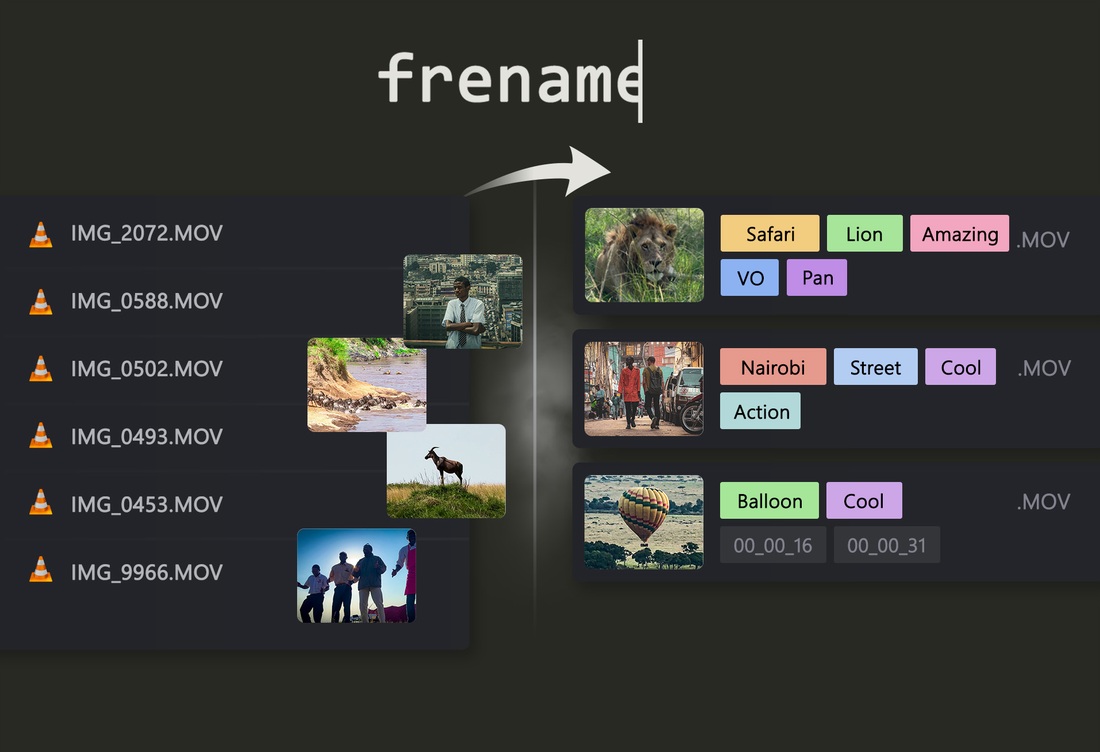
Tag your footage before you edit it.
I returned from a trip to Africa with 2,000 raw video files. No names, no structure — just MVI_0001.MP4 through MVI_2000.MP4. Before I could start editing I needed to know what was in each clip. frename let me watch each clip, tag it in seconds, and move on. By the time I opened Premiere the project was already organized.
This tool is for the hour before the edit begins.
What it does
Open a folder of video or image files. Watch each clip. Tag what you see. The file gets renamed automatically when you move to the next one.
File name format: tag1.tag2.description.in_HH_MM_SS.out_HH_MM_SS.mp4
Tags become part of the file name (no tag sidecar files, no database lock-in). Your file manager, NLE, and sync tools all see them.
When IN/OUT points are set, they are also written into the file name as in_HH_MM_SS and out_HH_MM_SS.
Screenshots
One annotated screenshot is enough to understand the layout:
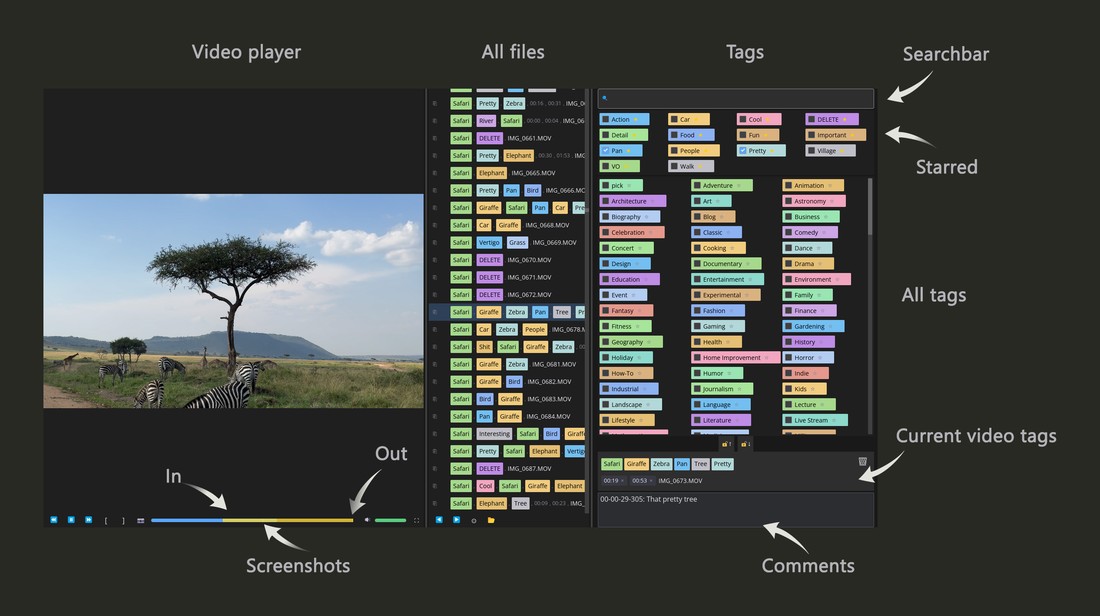
It shows the full app window with labeled UI elements:
- left file list
- center media player
- right tag panel (search, tag grid, comments)
- bottom rename preview
The workflow
- Open a folder (drag a file onto the window, or use the folder picker)
- Video starts playing automatically
- Tag what you see — click checkboxes or use arrow keys + Space
- Press
[and]to mark the usable segment of the clip (IN / OUT points) - Press
F12to drop a screenshot marker at any interesting moment - Add a timestamped note in the comment box if needed
- Press
PageDownto go to the next file — it renames and moves on - On the next file, press
⎘to copy all tags from the previous clip, then adjust
Most clips share 80% of their tags with their neighbors. Copying and tweaking is faster than tagging from scratch every time.
Interface
| Area | What it does |
|---|---|
| Left panel | File list for the current folder |
| Center | Video player with progress bar |
| Right panel | Tag search + tag grid + comment box |
| Bottom bar | Rename preview — drag chips to reorder tags in the file name |
Keyboard shortcuts
Navigation
| Key | Action |
|---|---|
PageDown |
Next file (saves rename) |
PageUp |
Previous file |
Tag panel
| Key | Action |
|---|---|
↑ ↓ ← → |
Move cursor in tag grid |
Space |
Toggle selected tag on/off |
| Any letter | Jump to search, filter tags |
Escape |
Clear search filter |
Enter |
Save unsaved tag to library |
Delete |
Remove tag from library |
Middle click |
Remove tag from library |
Video
| Key | Action |
|---|---|
F1 |
Seek −10 seconds |
F3 |
Seek +10 seconds |
F12 |
Mark screenshot at current position |
[ |
Set segment IN point |
] |
Set segment OUT point |
Tags
Tags are stored in a local SQLite database (frename.db next to the executable).
- Star a tag (click the ★ icon) — starred tags float to the top, always visible regardless of search
- Search — type anything in the search bar to filter the tag grid instantly
- Add a tag — type a new name and press Enter
- Unsaved tags — if a file already has a tag in its name that isn't in your library, it shows as unsaved (○). Press Enter to save it.
A good starting set for travel/documentary work is included on first launch: pick, skip, review, wide, close, drone, golden-hour, people, wildlife, and more.
Timeline markers, comments, and IN/OUT points
The progress bar is more than a scrubber — it shows everything you've noted about a clip at a glance:
- Screenshot markers — press
F12to drop a teal tick at the current position. The frame is saved as a JPEG sidecar next to the media file:{filename}.snap.HH-MM-SS-mmm.jpg. When the main file is renamed, screenshot sidecars are renamed with it. Ticks stay on the bar so you can see exactly where interesting moments are. - IN / OUT points — press
[to mark the start of a usable segment and]to mark the end. The segment highlights on the progress bar, and on save these markers are written into the file name asin_HH_MM_SSandout_HH_MM_SS. - Comments — the comment box (bottom-right) stores free text per file in a sidecar text file next to the media file:
{filename}.comment.txt. When the main file is renamed, the comment sidecar is renamed with it. Press the timestamp button to insert the current playback time — so a note like03:24 — shaky, stabilizestays tied to a specific moment.
Requirements
- Windows 10/11 (64-bit)
- GStreamer runtime (for video playback) — see GSTREAMER_SETUP.md
Building from source
cargo build
cargo run
Requires Rust stable and GStreamer development libraries. See GSTREAMER_SETUP.md for the GStreamer setup on Windows.